Meta Business Agent on WhatsApp: The Free Setup Guide for Appointment Businesses
Meta Business Agent is the AI built into WhatsApp Business that replies to your customers for you. Out of the box, it knows nothing about your prices or rules. This free 18-page guide gives you a fill-in template and a worked dental clinic example for every box, so it answers like your best receptionist.
Check your inbox.
We've sent the guide to .
Look for an email from Linton (linton@upturn.work). It may land in your Promotions or Spam tab. If it does, drag it to your main inbox or mark it "not spam" so our next tips reach you.
Hit reply and tell us what you're setting up. A real person reads every reply.
✓ Guide sent. Look for an email from Linton, in your inbox, Promotions or Spam.
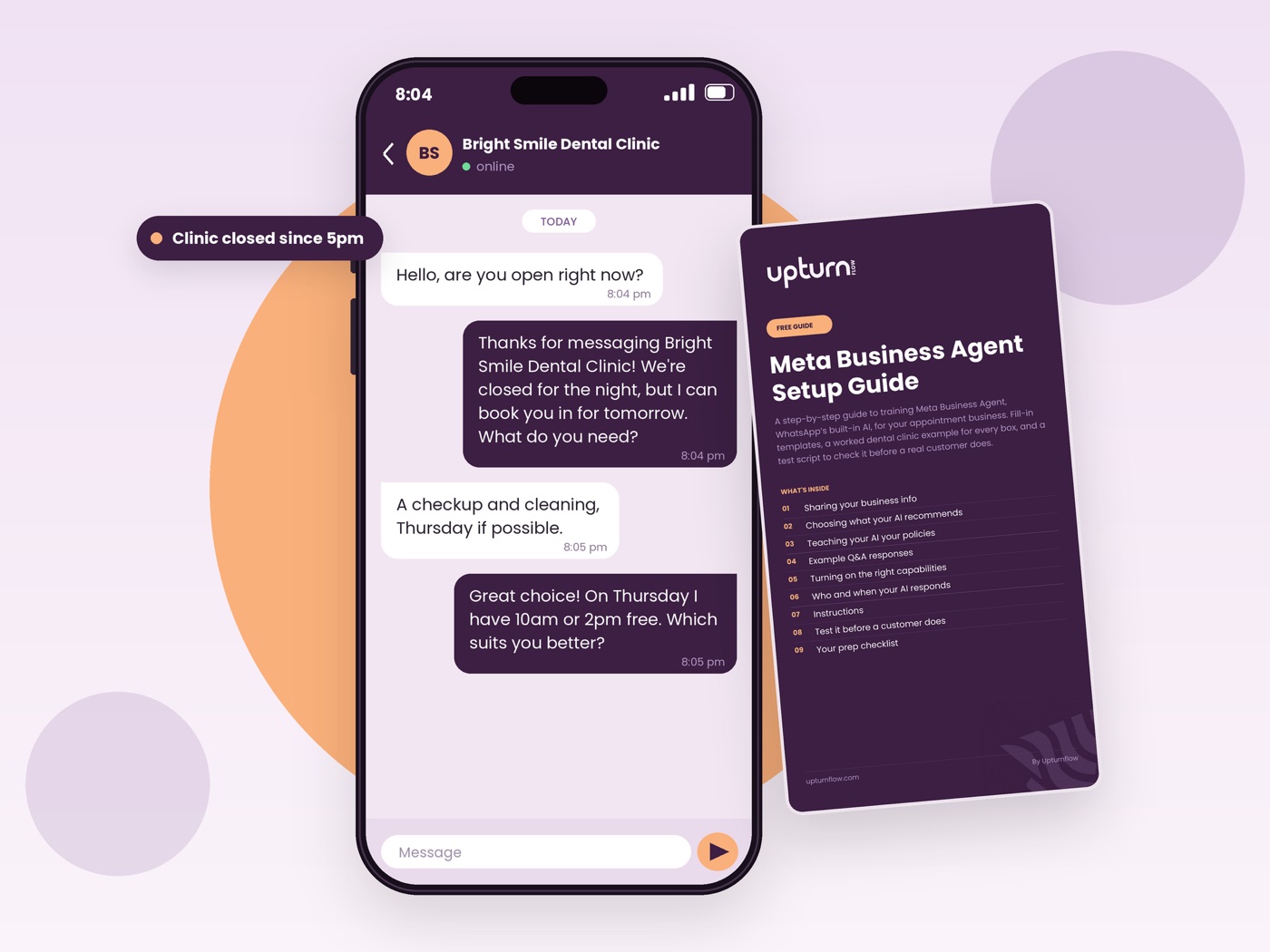
Customers message at all hours, and the first business to reply gets the booking
They ask about price, whether you have a slot, and where you are. If nobody replies fast, they book with whoever does.
WhatsApp Business now has a built-in AI agent that can reply for you. On its own, though, it is an empty box. It doesn't know your prices, your cancellation rules or how you like to sell, so it either says very little or guesses.
What is inside the free guide
Nine sections, in the order you fill in the boxes. Each has a blank template and a finished example next to it.
- 01Sharing your business infoyour description, hours day by day, and address
- 02Choosing what your AI recommendsbuild your service catalogue from your phone
- 03Teaching your AI your policiesbooking, deposits, cancellations and discounts
- 04Example Q&A responsesanswers in your own tone, written to sell and not just answer
- 05Turning on the right capabilitieswhat the AI may do, not just talk about
- 06Who and when your AI respondsleave friends, family and staff to a human
- 07Instructionsfive short rules worth writing
- 08Test it before a customer doesa test script to run from another phone
- 09Your prep checklistone list to check before you go live
What your AI agent can do once it is set up
- Answer questions about your prices, services and opening hours
- Offer open appointment times from your real calendar
- Collect the customer's name and the service they want
- Pass urgent cases to a human
- Stay quiet with the people you choose
How it works in 3 steps
- 1
Get the guide. Enter your details and it arrives straight away.
- 2
Fill in the templates. Draft your answers in your notes app, on your phone.
- 3
Paste them in. Copy your answers into WhatsApp Business → Tools → AI Agent.
Made for businesses that book people in
Dental clinics, physio and dermatology clinics, salons, barbers, spas, vets, opticians and studios. The worked examples use a dental clinic. The templates work for any appointment business.
Prefer to have it written for you?
The last page of the guide shows two ways to get the answers written for you, or to set it up together with our team. Start with the free guide, see how the pieces fit, then decide.
Frequently asked questions about Meta Business Agent on WhatsApp
What is Meta Business Agent on WhatsApp?
Meta Business Agent is the AI assistant built into the WhatsApp Business app that answers customer messages for you. It only knows what you teach it, through boxes you fill in under Tools → AI Agent: your business info, prices, policies, example answers and instructions. Once trained, it can answer questions, offer open appointment slots from your calendar and collect a customer's name and the service they want.
Does Meta Business Agent on WhatsApp work?
Yes, and how well it works depends on what you put in. If the training boxes are empty or vague, it guesses and gives generic answers that lose trust and sales. If they hold your real prices, policies and example replies, it answers like a receptionist who knows your business. It only works where Meta has made the AI agent available for your number, so open Tools → AI Agent to check.
Is it free to use Meta Business Agent on WhatsApp?
Meta gives free access for a limited time, then charges $14.99 a month. A human receptionist covers about 8 hours a day, while the agent can reply around the clock, which is three times the coverage. A receptionist in Lagos typically costs ₦80,000 to ₦150,000 a month. The setup guide itself is free.
Can Meta Business Agent on WhatsApp sound human?
Yes, it takes on the tone you write for it. Meta gives you an Instructions box for short tone rules, such as "Match our tone: warm and reassuring, never clinical or cold." You also write example customer questions with answers in your own words, and the agent follows that style. Keep each instruction to one clear idea, because the agent follows short, specific instructions more reliably than long paragraphs.
How do I set up Meta Business Agent on WhatsApp?
Open the WhatsApp Business app, go to Tools → AI Agent, and fill in these boxes in order:
- Business info: a full-paragraph description, hours day by day, and your address
- Catalogue: each service with a photo, name, price and description, then pick your bestsellers
- Purchasing info: how to book, payment types, cancellation policy and discounts
- Example Q&A: at least 5 real customer questions with answers in your tone
- Capabilities: turn on asking for customer info and booking appointments
- Response settings: choose who the AI replies to and when
- Instructions: short rules, such as "If a patient messages after 5pm, tell them the clinic is closed and we'll reply in the morning"
- Prep checklist: check every box, then go live
The free guide gives you a fill-in template and a finished example for every step.
Can I set up Meta Business Agent on WhatsApp by myself?
Yes. You need no code, and the whole setup runs from your phone inside the WhatsApp Business app. If you can copy and paste, you can do it. Most of your time goes into writing your own prices and policies, and the guide's templates mean you never start from a blank page. If you would rather not write it yourself, the last page of the guide shows two done-for-you options.
How do I connect Meta Business Agent on WhatsApp?
Use the Connections menu in the AI Agent settings to link your calendar app and Google Drive. The agent can then read your real availability and your files. Calendar options include Google Calendar, Outlook, Apple Calendar and Calendly.
Two rules keep it accurate:
- Block your non-working hours on the calendar, and block any walk-in or phone booking straight away, so the agent never offers a slot you can't give.
- Only link your website if it is current, because the agent reads it directly and will repeat old prices or hours. If your site is out of date, link your Google Business Profile or upload a short PDF instead.
How do I activate Meta Business Agent on WhatsApp?
You switch it on from Tools → AI Agent in the WhatsApp Business app, after you finish training it. Complete the business info, catalogue, purchasing info, example Q&A and Instructions boxes first. Then turn on only the capabilities that match how your business works. Under Response settings, choose who it replies to (existing contacts, people from your ads, everyone else) and whether it replies anytime or in set hours. Message it from another phone before real customers do. Menu names can change when Meta updates the app.